
Audit evidence management: how to give evidence an owner
An evidence folder becomes useful when someone can explain what is inside it.
A reviewer should be able to see what the record covers, where it came from, who checked it and what remains unresolved—without reconstructing the process from email.
Picture a reviewer opening a “backup testing” folder. There is a green dashboard screenshot, a log and a file called final-v2. The infrastructure owner knows how they fit together. The reviewer does not. A straightforward request becomes a series of emails: Which system was restored? When? Did anyone check the recovered data?
The problem is not always a lack of evidence. Often, the evidence has lost its context on the way to the person who needs it.
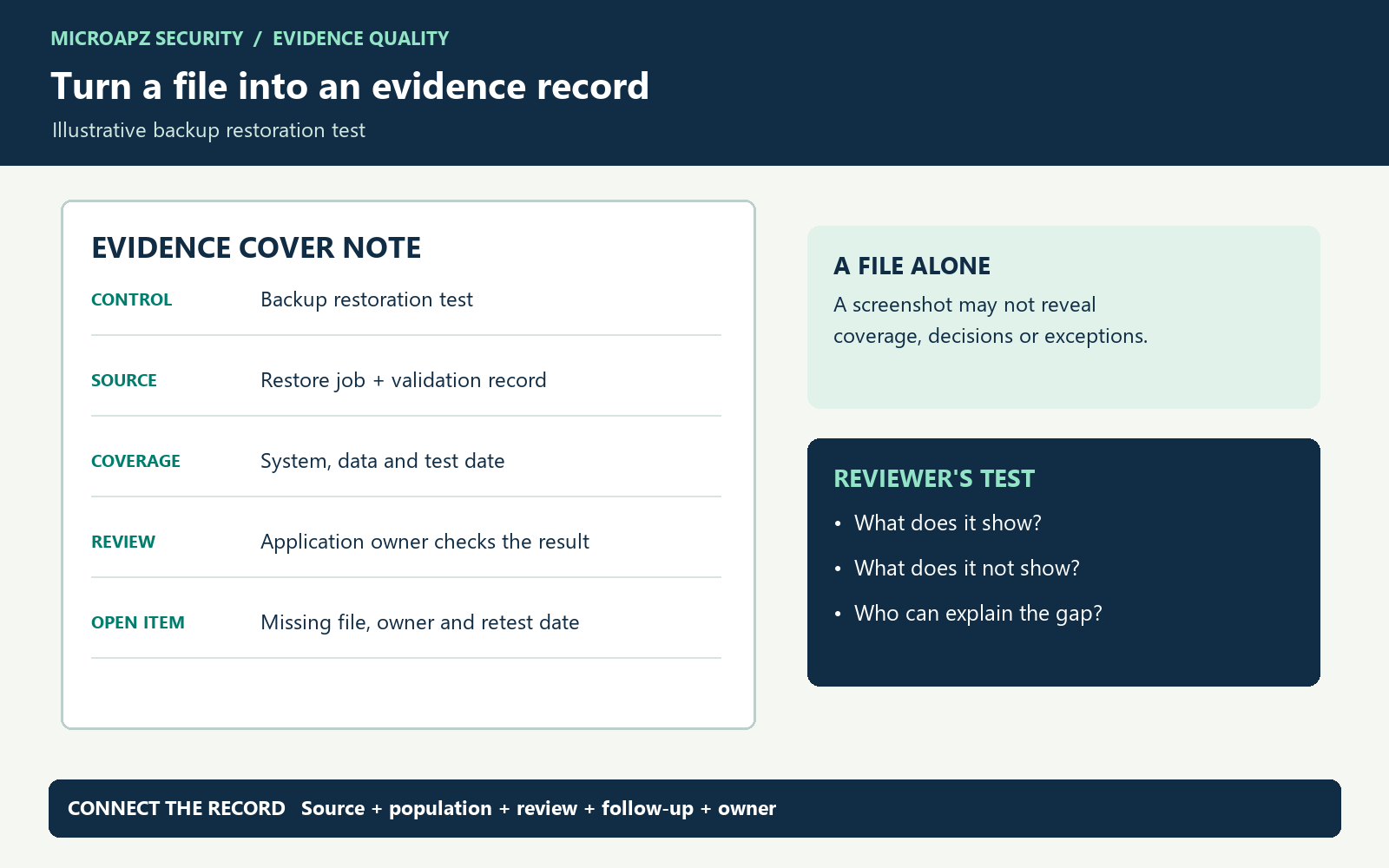
Keep the record connected to the underlying evidence and the person who can explain it.
What should an evidence record contain?
The exact evidence depends on the control and assessment. A useful starting record has these fields:
- Control and purpose: what question is this item intended to answer?
- Owner and source: who maintains it and which system or process produced it?
- Coverage: the relevant system, population and period, including meaningful exclusions.
- Review: who checked it, when, what they looked for and their conclusion.
- Exceptions: unresolved issues, accountable owners and follow-up dates.
- Location and access: a stable link or reference, with appropriate permissions and retention.
Worked example: a backup restoration test
Suppose a team restores one customer-support database to an isolated environment. The job succeeds, but an application owner discovers that a required attachment is missing. A green backup dashboard shows a job status; it does not by itself show that the application can use the restored data.
| Record | Useful context |
|---|---|
| Test plan | System, backup selected, scope and intended recovery objective. |
| Restore job | Start/end time, source and destination, job status and logs. |
| Validation | Who checked the restored application and data, what was tested and the result. |
| Exception | Missing attachment, impact, owner, remediation and retest date. |
This is an illustrative scenario. Use synthetic information where practical and limit access to real recovery records.
Copyable evidence cover note
Control / question: …
Evidence owner: …
Source and link: …
System, population and period: …
Reviewed by / date / conclusion: …
Exceptions and follow-up: …
From weak evidence to a useful evidence pack
| Starting point | Why a reviewer may ask more | Make it useful |
|---|---|---|
| Green backup dashboard | It may show backup completion, not restoration or application usability. | Link the restore job to validation by the application owner. |
| Test marked “passed” | The scope and unresolved failure may be hidden. | Record the test cases, actual results and any exception. |
| Policy with a signature | Approval alone does not show a control operated over a period. | Pair policy with relevant operating records for the question being assessed. |
These examples are prompts for investigation, not a universal rule that one evidence type always satisfies an assessment. Confirm sufficiency, period and sampling with the reviewer.
Check coverage before collecting screenshots
Start with the scope: which systems, datasets and recovery scenarios should be tested? Record how the selection was made and any exclusions. Reconcile the test results to that scope. A successful database restore can still leave application files, configuration or integrations untested.
How to make a restore test technically meaningful
- Identify the backup set, source system, recovery point and isolated destination. Ensure the test does not overwrite production.
- Record when recovery started and when the service became usable. Compare the observed recovery time and data age with the organisation’s approved objectives; document how each was measured.
- Have the application owner validate representative transactions, permissions, attachments and dependencies—not merely a successful job status.
- Link failed checks to remediation, owner and retest. Restrict the evidence pack because logs and screenshots may contain sensitive data.
A single successful test demonstrates the tested configuration and point in time. It does not prove that every backup, region or disaster scenario will recover.
Backup data current to 09:00; disruption at 09:50
Potential data gap: 50 minutes, assuming the backup is usable and its consistency time is confirmed.Disruption 09:50 → usable 11:20
90 minutes from disruption; the restore starts at 10:00 and takes 80 minutes.Define the organisation’s measurement boundaries first. A successful job is not proof that the application and its dependencies work.
For further background, see NIST SP 800-34 Rev. 1. The times above are synthetic and are not prescribed targets.
Test your evidence before the reviewer does
- Choose one recurring control and collect its latest evidence.
- Ask someone outside the process to explain what the record shows and what it cannot show.
- Write down their questions. Add missing context or link the appropriate source.
- Check that any exceptions have owners and review dates.
- Restrict access and remove unnecessary personal information in line with your policies.
Who owns the evidence?
The control owner is accountable for making the evidence understandable, but collection and storage can involve several teams. Name the person who can answer questions and keep the record current. Agree handoffs rather than assuming that the person who uploaded a file understands the control.
Start with one control. If another person can follow its story without a guided tour, you have a pattern worth extending.
Discuss your evidence workflow →