
How to close the evidence loop after an access review
An access review is marked complete. Then someone asks what happened to the accounts that should have been removed.
Close a control action only when the decision, the work performed, independent or appropriate review, and any remaining exception can be followed together.
An access review ends on a Friday. The spreadsheet is signed, the task turns green, and everyone moves on. On Monday, a reviewer asks a reasonable question: “Which accounts were actually removed?”
Now the team searches tickets and emails. Two removals can be found; the third was delayed, but nobody recorded why. The original review was not useless. It simply stopped before the outcome could be explained.
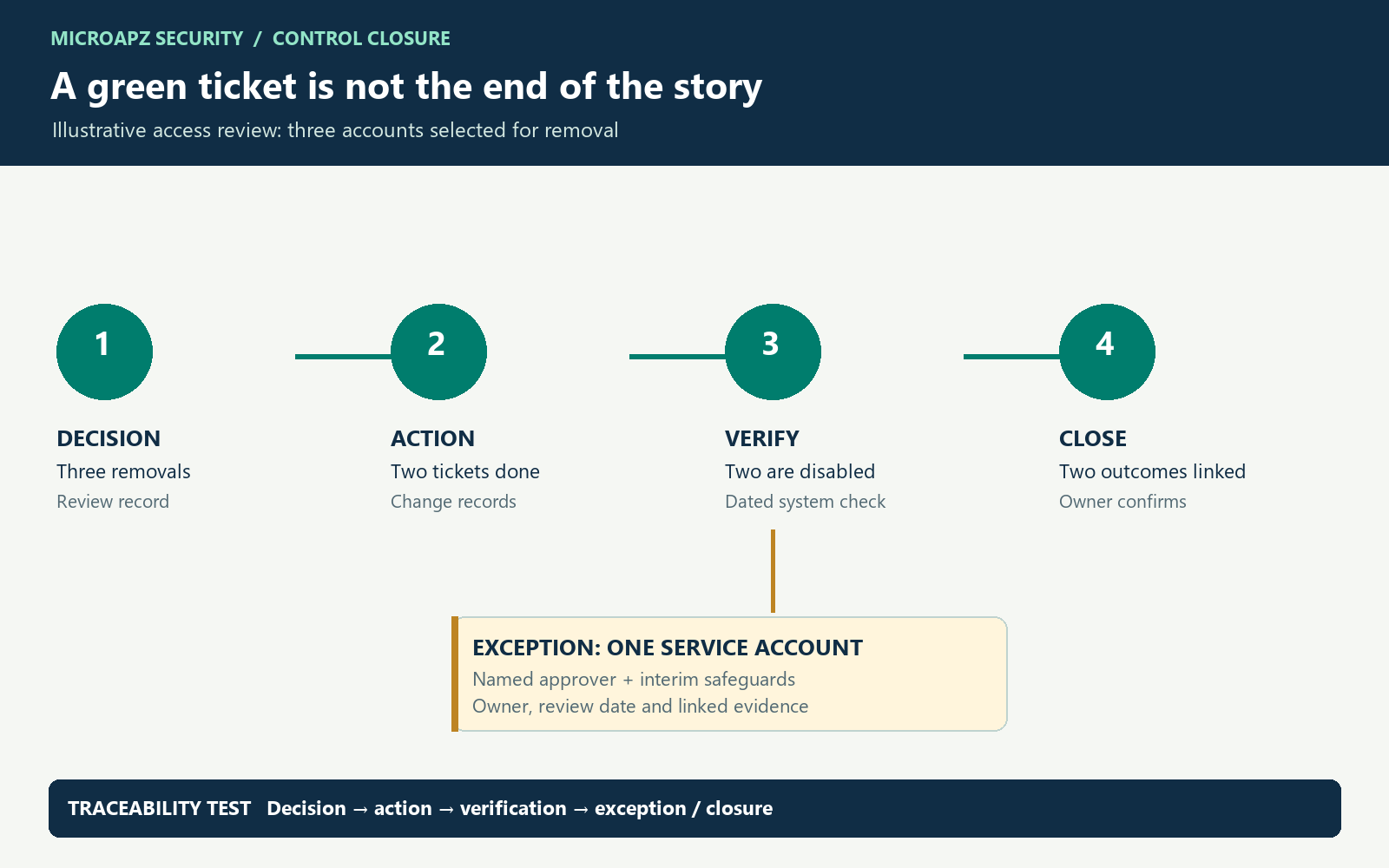
Each step should point to the record that supports it.
What is evidence closure?
Evidence closure is the point at which an accountable person can explain the original decision, the resulting action, how the outcome was checked and what remains unresolved. A completed ticket can be part of that record; it is not automatically proof that the intended outcome occurred.
Work through an access-review example
Imagine a review identified three accounts for removal. The owner submits three tickets. Two are completed; one belongs to a service integration whose owner asks for more time.
| Step | Record to retain | Question to answer |
|---|---|---|
| Decision | Dated review with the three decisions | What was supposed to happen, and why? |
| Action | Linked change or service tickets | Who acted and when? |
| Verification | Appropriately dated system check | Are the two accounts actually disabled? |
| Exception | Approved exception and follow-up | Who accepted the delay and when will it be reviewed? |
A useful closure statement could read: “Two removals verified against the identity system on [date]. One service account remains active under exception [reference], approved by [role] until [date]. [Owner] will review it by [date].” These are illustrative details; use your organisation’s actual records and approval rules.
The five fields every closure record needs
- Decision: the intended outcome and its source.
- Action owner: the person responsible for implementation.
- Evidence: a link to the dated result, with its relevant population or scope.
- Review: who checked the result, when, and against which decision.
- Exceptions: what is outstanding, its owner, approval and next review date.
Action: …
Decision / reference: …
Owner and completion date: …
Evidence link and period: …
Verified by / date: …
Outstanding exception / owner / review date: …
What counts as a convincing verification?
Match the check to the decision. If the decision is to disable an account, a ticket assignment shows work was requested; a dated system status showing the same account disabled is stronger evidence of the result. Check the account identifier and application, not just a similar display name. Where access is granted through several paths, investigate whether disabling one account leaves another route open.
Record who verified the result and how. The appropriate level of independent review depends on the control design and your organisation’s requirements; do not invent a second approval simply to fill a field. If the check cannot be completed, keep the action open or document an approved exception.
Test the full access path
For an account removal, reconcile the original review population to action tickets using immutable account IDs. Check the source identity, application-local account, group membership, privileged roles and federated access where applicable. For a service account, identify dependent jobs and rotate or revoke credentials only under a safe change plan. A disabled identity can leave active sessions, API keys or application-local credentials; establish the actual product behaviour before concluding that access is gone.
Evidence bundle: review export and filters → decision with account ID → change reference → dated source-system result → reviewer and exception record. Retain the time zone and system source so the sequence can be reconstructed. Do not expose passwords or tokens in the bundle.
- Identity: disabled in the authoritative directory?
- Entitlements: groups, roles and local accounts removed?
- Credentials: API keys or service credentials still usable?
- Sessions: does the product invalidate existing sessions?
- Outcome: test the relevant denied access and record exceptions.
Do not assume every system behaves alike. Confirm the product’s documented and observed behaviour.
When is an exception actually managed?
An exception needs a reason, the affected account or population, an authorised decision, any interim protection, an owner and an expiry or review date. For the service account above, the owner might limit its permissions while an integration is migrated. That measure and its evidence should be recorded; a future review date alone does not reduce access.
Common failure points
- The screenshot has no context. Add the system, date, population and what it is meant to demonstrate.
- The ticket says “done”. Link it to a check of the intended result where appropriate.
- The exception vanishes into a note. Give it a decision, owner and review date.
- The AI summary becomes the evidence. A summary can help find missing fields, but the reviewer still needs the underlying records.
Try it this week
Select one recurring control. For its next cycle, collect the decision, action, verification and exception in one navigable record. Count clarification requests and reopened tasks, then compare the next cycle. The goal is a record another person can follow without the process owner narrating every step.
What if the result is only partly complete?
Separate the completed removals from the unresolved item. Verify the completed changes, then carry the remaining account in the exception register with its risk decision and due date. Do not describe the entire review as fully remediated. At the next review, confirm whether the exception expired, was renewed by an authorised owner or was resolved and retested.
Further reading: NIST SP 800-53 Rev. 5 provides a catalogue of security and privacy controls, including account management. The closure workflow and sample records in this article are illustrative MicroApz guidance; apply the requirements and control design relevant to your organisation.
Discuss your requirements →